PPC

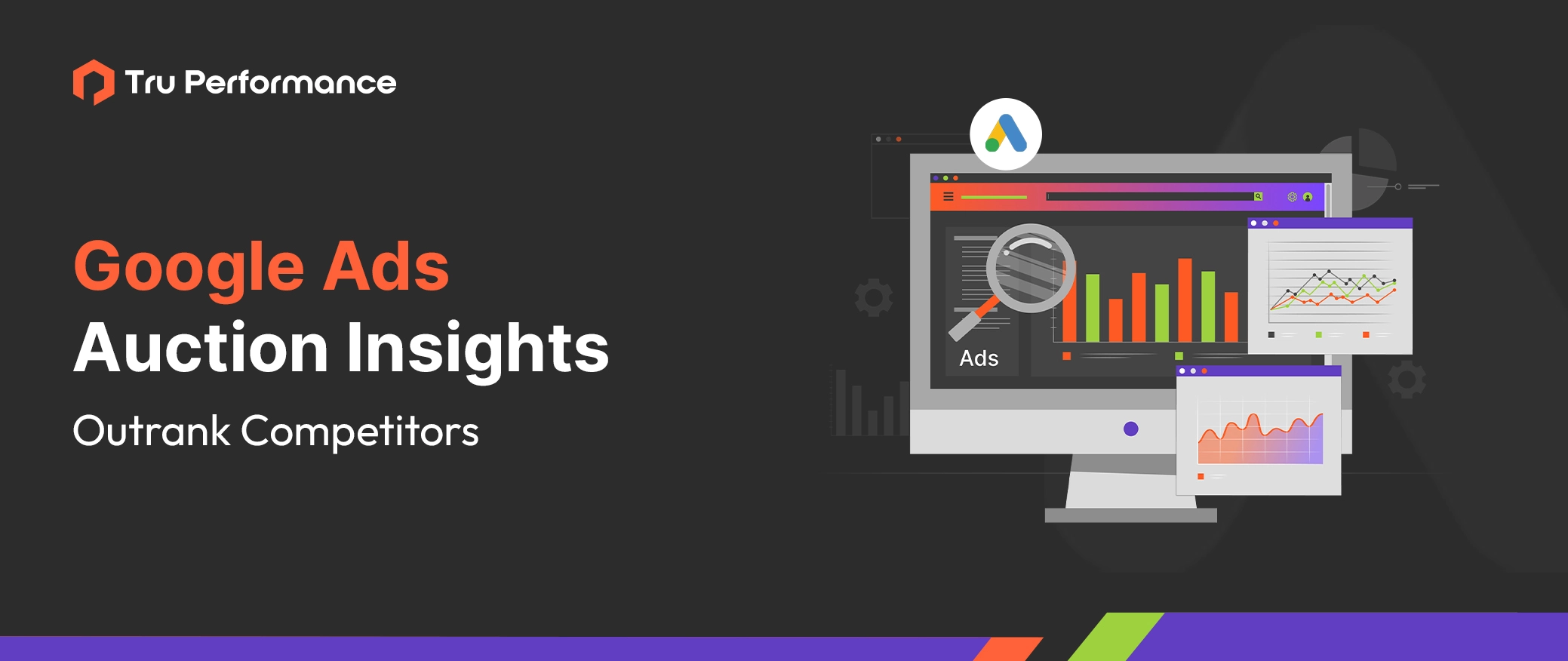
Google Ads Auction Insights: Master Competitive Analysis & Outrank Your Competitors

Published February 20, 2025 PPC 5 min read
Listen to this article
6:00
Google Ads is a highly competitive platform where multiple advertisers bid for the same audience. But how do you know who your real competitors are and how well you're performing against them? That’s where Auction Insights comes in! The Google Ads Auction Insights Report provides real-time competitor data, helping advertisers refine their strategies, adjust bids, and improve ad placements to outperform the competition. In this guide, we’ll break down: What Google Ads Auction Insights is, and how it works How to access and interpret the report Key metrics explained in simple terms Proven strategies to use Auction Insights to beat competitors What Are Auction Insights in Google Ads? Auction Insights is a competitive analysis tool within Google Ads that allows you to see how your ads compare to competitors bidding on the same keywords. Unlike other competitor research tools, Auction Insights shows real-time ad auction data, making it one of the most accurate ways to assess Google Ads bidding competition. This data helps advertisers: Identify major competitors in the same ad auctions Determine impression share vs. competitors Adjust bidding strategies for better positioning Optimize ad placements based on competitor behavior Pro Tip: Regularly checking Auction Insights can help you track new competitors entering the market and identify opportunities to dominate your niche. How to Access Auction Insights Report? To find the Auction Insights report in Google Ads: Log into Google Ads Navigate to the Campaigns, Ad Groups, or Keywords tab Select the segment you want to analyze Click on "Auction Insights" Pro Tip: You can analyze Auction Insights at different levels—Campaign, Ad Group, or Keyword—depending on how granular you want the data. Key Metrics in Auction Insights (Explained) The Auction Insights report provides six key performance metrics that help you analyze where you stand against competitors: 1. Impression Share Definition: The percentage of times your ad appeared out of the total available impressions. Higher Impression Share: Strong ad visibility and budget allocation Lower Impression Share: Competitors may be outbidding or outranking you Example: If your Impression Share is 60%, your ads appeared 60 times out of every 100 available searches. 2. Overlap Rate Definition: How often another advertiser’s ad appears in the same auction as yours. High Overlap Rate: Frequent competition with the same advertiser Low Overlap Rate:Less direct competition Example: If Competitor A has a 20% overlap rate, it means their ads appeared 20% of the time in the same auctions as yours. 3. Position Above Rate Definition: How often another advertiser’s ad appears in a higher position than yours when both were shown in the same auction. High Position Above Rate: Competitor bids higher or has better quality scores Low Position Above Rate: You are ranking higher than the competitor Example: If Competitor B has a 27% position above the rate, their ad ranked above yours 27% of the time when both were shown. 4. Top of Page Rate Definition: The percentage of times your ad appeared at the top of the search results (above organic listings). Higher Top of Page Rate: Your ad gets prime visibility Lower Top of Page Rate: Competitors are taking the top spots Example: If your top-of-page rate is 75%, it means your ad appeared in the top section of Google Ads 75% of the time. 5. Absolute Top of Page Rate The percentage of times your ad was the very first ad on the search results page. High Absolute Top Rate: Your ad consistently wins the top position Low Absolute Top Rate: Competitors are outbidding you for the top spot Example: If Competitor C has a 10% absolute top-of-page rate, their ad appeared in the #1 position in 10% of auctions. 6. Outranking Share Definition: How often your ad ranked higher than a competitor’s or appeared when their ad didn’t show. Higher Outranking Share: You are consistently outperforming a competitor Lower Outranking Share: Competitors are outbidding you more frequently Example: If your outranking share against Competitor D is 96%, your ad was ranked higher than theirs or appeared when there wasn't 60% of the time. How to Use Auction Insights to Improve Performance Now that you understand the metrics let’s look at how to apply these insights to optimize your campaigns. 1. Adjust Your Bidding Strategy If your Impression Share is low, consider increasing bids or budget. If a competitor consistently outranks you, test bid adjustments or Smart Bidding strategies like Target Impression Share. 2. Optimize Ad Quality for Better Rankings Google Ads considers more than just bids—it also evaluates Quality Scores (CTR, relevance, landing page experience). Higher Position Above Rate? Improve ad copy, landing page experience, and overall Quality Score. Use responsive search ads to test multiple variations and boost engagement. 3. Monitor Competitor Trends & Adjust Strategy Competitor behavior fluctuates over time, so review Auction Insights regularly and adjust accordingly. If new competitors emerge, assess their overlap rate and analyze their ad copy. If competitors drop out, capitalize on the opportunity to increase market share. 4. Leverage Ad Extensions for Better Visibility If competitors are ranking higher, improve your ad visibility by adding: Callout Extensions (Highlight unique services) Callout Extensions are short, descriptive text snippets that appear below your ad copy to highlight key benefits, services, or special offers. Structured Snippets (Showcase specific practice areas) Structured Snippet Extensions allow advertisers to display a list of related offerings or categories under predefined headers like Services, Amenities, Brands, or Types. Site Link Extensions (Drive traffic to important landing pages) Sitelink Extensions provides additional clickable links below your main ad, allowing users to navigate directly to relevant pages on your website (e.g., Contact Us, Pricing, About Us, or Specific Services). The Google Ads Auction Insights Report is a powerful competitive analysis tool that can help you make data-driven decisions and outperform your competitors. You can fine-tune your bidding strategy, optimize ad quality, and boost your campaign performance by analyzing key metrics like Impression Share, Position Above Rate, and Outranking Share. Want to dominate your competition in Google Ads? Start by analyzing your Auction Insights report today!
TRUPERFORMANCE_blogimage_180225_TP087_v1

Explore AI Summary

Google Ads is a highly competitive platform where multiple advertisers bid for the same audience. But how do you know who your real competitors are and how well you’re performing against them?

That’s where Auction Insights comes in!

The Google Ads Auction Insights Report provides real-time competitor data, helping advertisers refine their strategies, adjust bids, and improve ad placements to outperform the competition.

In this guide, we’ll break down:

  • What Google Ads Auction Insights is, and how it works
  • How to access and interpret the report
  • Key metrics explained in simple terms
  • Proven strategies to use Auction Insights to beat competitors

What Are Auction Insights in Google Ads?

Auction Insights is a competitive analysis tool within Google Ads that allows you to see how your ads compare to competitors bidding on the same keywords.

Unlike other competitor research tools, Auction Insights shows real-time ad auction data, making it one of the most accurate ways to assess Google Ads bidding competition.

This data helps advertisers:

  • Identify major competitors in the same ad auctions
  • Determine impression share vs. competitors
  • Adjust bidding strategies for better positioning
  • Optimize ad placements based on competitor behavior

Pro Tip: Regularly checking Auction Insights can help you track new competitors entering the market and identify opportunities to dominate your niche.

How to Access Auction Insights Report?

To find the Auction Insights report in Google Ads:

  1. Log into Google Ads
  2. Navigate to the Campaigns, Ad Groups, or Keywords tab
  3. Select the segment you want to analyze
  4. Click on “Auction Insights”

Pro Tip: You can analyze Auction Insights at different levels—Campaign, Ad Group, or Keyword—depending on how granular you want the data.

Key Metrics in Auction Insights (Explained)

The Auction Insights report provides six key performance metrics that help you analyze where you stand against competitors:

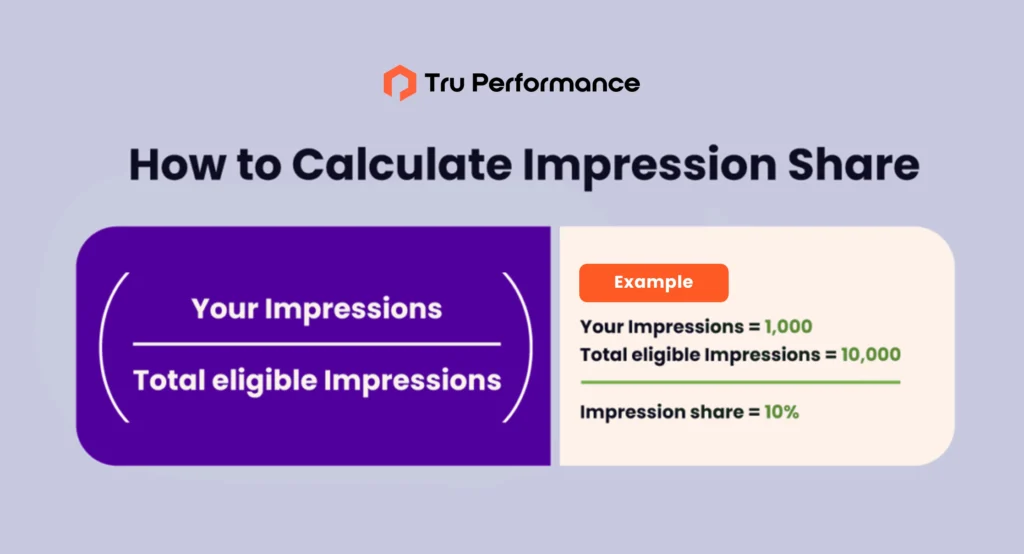
1. Impression Share

Definition: The percentage of times your ad appeared out of the total available impressions.

  • Higher Impression Share: Strong ad visibility and budget allocation
  • Lower Impression Share: Competitors may be outbidding or outranking you

Example: If your Impression Share is 60%, your ads appeared 60 times out of every 100 available searches.

2. Overlap Rate

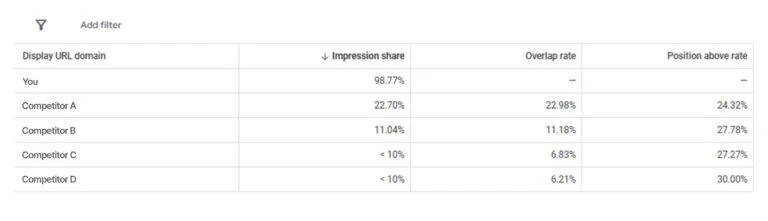
Definition: How often another advertiser’s ad appears in the same auction as yours.

  • High Overlap Rate: Frequent competition with the same advertiser
  • Low Overlap Rate:Less direct competition

Example: If Competitor A has a 20% overlap rate, it means their ads appeared 20% of the time in the same auctions as yours.

3. Position Above Rate

Definition: How often another advertiser’s ad appears in a higher position than yours when both were shown in the same auction.

  • High Position Above Rate: Competitor bids higher or has better quality scores
  • Low Position Above Rate: You are ranking higher than the competitor

Example: If Competitor B has a 27% position above the rate, their ad ranked above yours 27% of the time when both were shown.
4. Top of Page Rate

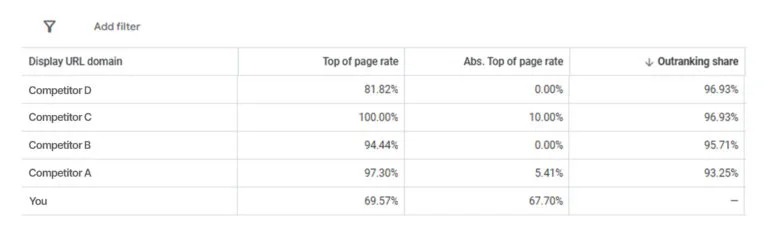
Definition: The percentage of times your ad appeared at the top of the search results (above organic listings).

  • Higher Top of Page Rate: Your ad gets prime visibility
  • Lower Top of Page Rate: Competitors are taking the top spots

Example: If your top-of-page rate is 75%, it means your ad appeared in the top section of Google Ads 75% of the time.
5. Absolute Top of Page Rate

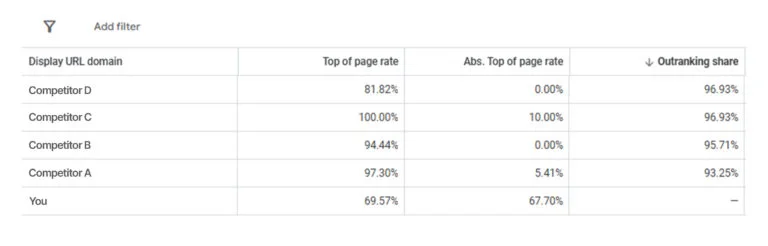
The percentage of times your ad was the very first ad on the search results page.

  • High Absolute Top Rate: Your ad consistently wins the top position
  • Low Absolute Top Rate: Competitors are outbidding you for the top spot

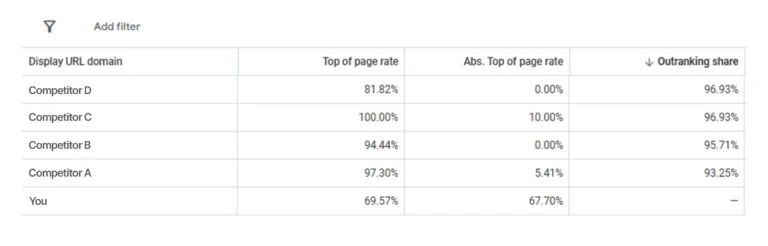
Example: If Competitor C has a 10% absolute top-of-page rate, their ad appeared in the #1 position in 10% of auctions.
6. Outranking Share

Definition: How often your ad ranked higher than a competitor’s or appeared when their ad didn’t show.

  • Higher Outranking Share: You are consistently outperforming a competitor
  • Lower Outranking Share: Competitors are outbidding you more frequently

Example: If your outranking share against Competitor D is 96%, your ad was ranked higher than theirs or appeared when there wasn’t 60% of the time.
How to Use Auction Insights to Improve Performance

Now that you understand the metrics let’s look at how to apply these insights to optimize your campaigns.

1. Adjust Your Bidding Strategy

  • If your Impression Share is low, consider increasing bids or budget.
  • If a competitor consistently outranks you, test bid adjustments or Smart Bidding strategies like Target Impression Share.

2. Optimize Ad Quality for Better Rankings

Google Ads considers more than just bids—it also evaluates Quality Scores (CTR, relevance, landing page experience).

  • Higher Position Above Rate? Improve ad copy, landing page experience, and overall Quality Score.
  • Use responsive search ads to test multiple variations and boost engagement.

3. Monitor Competitor Trends & Adjust Strategy

Competitor behavior fluctuates over time, so review Auction Insights regularly and adjust accordingly.

  • If new competitors emerge, assess their overlap rate and analyze their ad copy.
  • If competitors drop out, capitalize on the opportunity to increase market share.

4. Leverage Ad Extensions for Better Visibility

If competitors are ranking higher, improve your ad visibility by adding:

  • Callout Extensions (Highlight unique services)

Callout Extensions are short, descriptive text snippets that appear below your ad copy to highlight key benefits, services, or special offers.

  • Structured Snippets (Showcase specific practice areas)

Structured Snippet Extensions allow advertisers to display a list of related offerings or categories under predefined headers like Services, Amenities, Brands, or Types.

  • Site Link Extensions (Drive traffic to important landing pages)
    Sitelink Extensions provides additional clickable links below your main ad, allowing users to navigate directly to relevant pages on your website (e.g., Contact Us, Pricing, About Us, or Specific Services).

The Google Ads Auction Insights Report is a powerful competitive analysis tool that can help you make data-driven decisions and outperform your competitors.

You can fine-tune your bidding strategy, optimize ad quality, and boost your campaign performance by analyzing key metrics like Impression Share, Position Above Rate, and Outranking Share.

Want to dominate your competition in Google Ads? Start by analyzing your Auction Insights report today!
Insights from experts driving results on the ground

SEO Agency vs In-House Team: How Growth-Stage SaaS Should Actually Decide
17 min read

SEO Agency vs In-House Team: How Growth-Stage SaaS Should Actually Decide

Your board asked why organic is flat. You have a plan, a keyword set and three technical fixes that have been written up twice....
Read more
Building a B2B Attribution Model Your CFO Will Trust
13 min read

Building a B2B Attribution Model Your CFO Will Trust

Your attribution report says marketing sourced $4.2M in pipeline last quarter. Finance’s report says marketing sourced $1.6M. Both numbers were...
Read more
AI Marketing Ops vs. Traditional Ops: What Actually Changes
8 min read

AI Marketing Ops vs. Traditional Ops: What Actually Changes

The category confusion The phrase “AI marketing ops” has gotten loose in 2026. Vendors use it to describe any marketing...
Read more
What to Look for in an AI Marketing Operations Partner
8 min read

What to Look for in an AI Marketing Operations Partner

Why this evaluation matters more in 2026 Choosing the wrong AI marketing ops partner in 2026 doesn’t just waste a...
Read more
Explore resources