



Google Ads Auction Insights: Master Competitive Analysis & Outrank Your Competitors
20 Feb, 2025
Our advisory services empower enterprises with data-backed insights and strategic consultation. We identify operational gaps, craft actionable strategies, and align business goals with growth opportunities, helping organizations improve processes, drive innovation, and achieve sustainable performance across every function through expert guidance.
We enable enterprises to thrive digitally through data-driven strategies, marketing intelligence, and integrated technology. From managed tech solutions and creative design to lifecycle automation and analytics, our digital operations deliver performance optimization, customer engagement, and transformative growth across every digital channel.
We help streamline complex operations to deliver scalability and efficiency. Through various business operation services, we simplify workflows, enhance productivity, and ensure friction-free onboarding that drives operational excellence, measurable growth, and long-term business success for enterprises.
We build intelligent systems that combine AI agents, applications, and smart automations to transform enterprise workflows. Our solutions enhance decision-making, reduce manual effort, and optimize cost and performance, which empowers organizations with scalable, data-driven innovation for future-ready growth.
Learn about our journey, core values, and vision for business transformation. We combine innovation, expertise, and collaboration to empower enterprises with scalable solutions that enhance performance, accelerate growth, and create long-term value across industries.

Join a culture of innovation and excellence that believes in inclusivity and diversity. Explore exciting career opportunities, collaborate with forward-thinking teams, and help redefine business performance through strategy, technology, and digital transformation.
Stay updated with the latest news, media coverage, and announcements. Read stories about our achievements, partnerships, and innovations that shape the future of business transformation and digital excellence.
Discover insights, thought leadership, and trends shaping the future of business operations, AI, marketing, and technology. Our blogs offer expert perspectives and actionable ideas to help organizations adapt and excel in a fast-paced world.

Stay informed with curated updates, success stories, and expert insights, delivered straight to you. Our newsletters keep you ahead of emerging trends, digital innovations, and strategies driving enterprise performance and growth.
Learn about real-world client success stories that showcase performance achieved through our solutions. Explore how we’ve helped clients across industries enhance efficiency, boost growth, and achieve digital transformation goals.
Access valuable resources, guides, and tools designed to accelerate your business growth. Download resources, checklists, and frameworks that provide actionable insights and proven methods to enhance enterprise performance.
20 Feb, 2025
Google Ads is a highly competitive platform where multiple advertisers bid for the same audience. But how do you know who your real competitors are and how well you’re performing against them?
That’s where Auction Insights comes in!
The Google Ads Auction Insights Report provides real-time competitor data, helping advertisers refine their strategies, adjust bids, and improve ad placements to outperform the competition.
In this guide, we’ll break down:
Auction Insights is a competitive analysis tool within Google Ads that allows you to see how your ads compare to competitors bidding on the same keywords.
Unlike other competitor research tools, Auction Insights shows real-time ad auction data, making it one of the most accurate ways to assess Google Ads bidding competition.
This data helps advertisers:
Pro Tip: Regularly checking Auction Insights can help you track new competitors entering the market and identify opportunities to dominate your niche.
To find the Auction Insights report in Google Ads:
Pro Tip: You can analyze Auction Insights at different levels—Campaign, Ad Group, or Keyword—depending on how granular you want the data.
The Auction Insights report provides six key performance metrics that help you analyze where you stand against competitors:
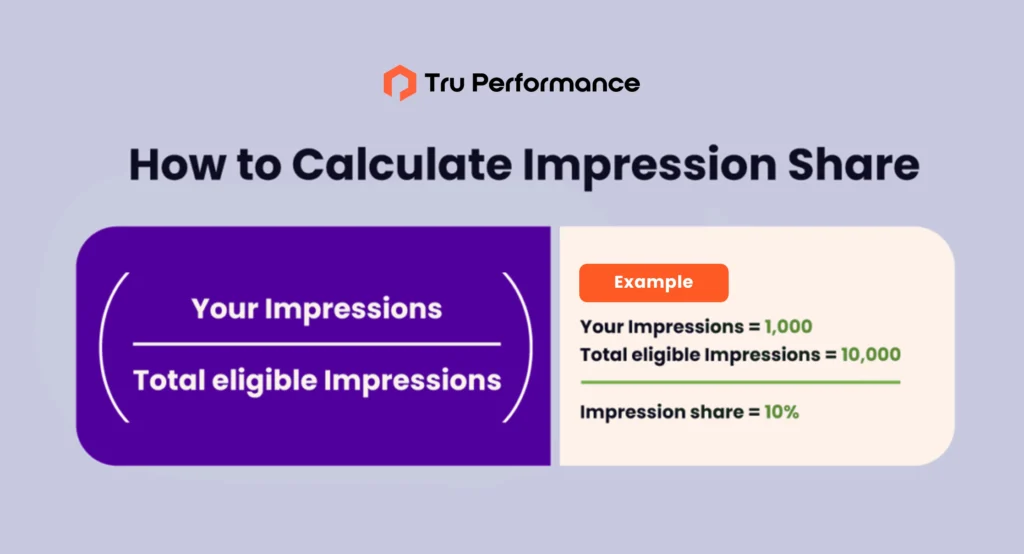
Definition: The percentage of times your ad appeared out of the total available impressions.
Example: If your Impression Share is 60%, your ads appeared 60 times out of every 100 available searches.

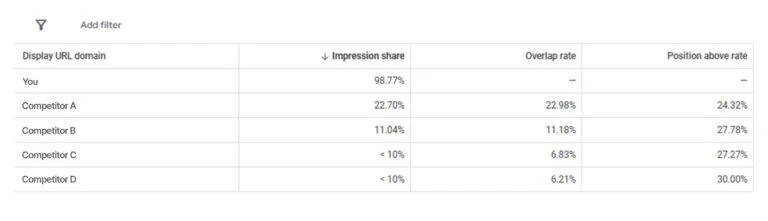
Definition: How often another advertiser’s ad appears in the same auction as yours.
Example: If Competitor A has a 20% overlap rate, it means their ads appeared 20% of the time in the same auctions as yours.

Definition: How often another advertiser’s ad appears in a higher position than yours when both were shown in the same auction.
Example: If Competitor B has a 27% position above the rate, their ad ranked above yours 27% of the time when both were shown.
Definition: The percentage of times your ad appeared at the top of the search results (above organic listings).
Example: If your top-of-page rate is 75%, it means your ad appeared in the top section of Google Ads 75% of the time.
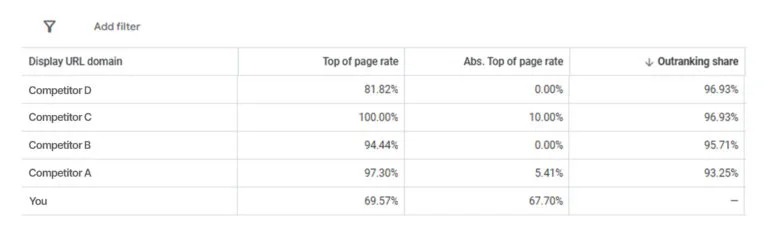
The percentage of times your ad was the very first ad on the search results page.
Example: If Competitor C has a 10% absolute top-of-page rate, their ad appeared in the #1 position in 10% of auctions.
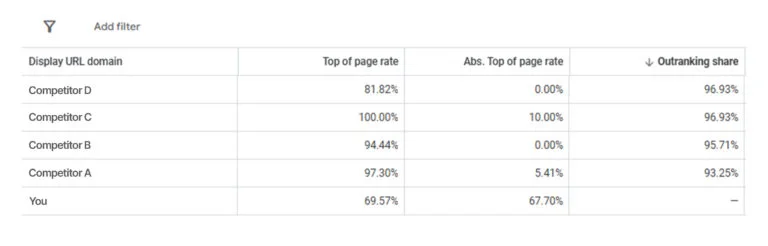
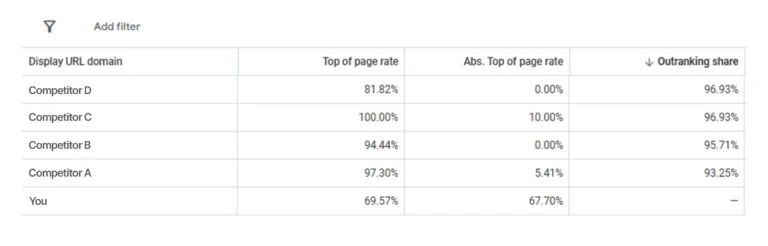
Definition: How often your ad ranked higher than a competitor’s or appeared when their ad didn’t show.
Example: If your outranking share against Competitor D is 96%, your ad was ranked higher than theirs or appeared when there wasn’t 60% of the time.
Now that you understand the metrics let’s look at how to apply these insights to optimize your campaigns.
Google Ads considers more than just bids—it also evaluates Quality Scores (CTR, relevance, landing page experience).
Competitor behavior fluctuates over time, so review Auction Insights regularly and adjust accordingly.
If competitors are ranking higher, improve your ad visibility by adding:
Callout Extensions are short, descriptive text snippets that appear below your ad copy to highlight key benefits, services, or special offers.
Structured Snippet Extensions allow advertisers to display a list of related offerings or categories under predefined headers like Services, Amenities, Brands, or Types.
The Google Ads Auction Insights Report is a powerful competitive analysis tool that can help you make data-driven decisions and outperform your competitors.
You can fine-tune your bidding strategy, optimize ad quality, and boost your campaign performance by analyzing key metrics like Impression Share, Position Above Rate, and Outranking Share.
Want to dominate your competition in Google Ads? Start by analyzing your Auction Insights report today!
The Enterprise Martech Problem: Data Without Insights Most enterprises face a critical challenge today. They collect massive customer data across CRM platforms, analytics tools, ad networks, and email systems. Yet this data remains siloed and disconnected from actual decision making. Marketing teams still rely on backward looking reports instead of forward looking intelligence. Customers demand […]
Introduction Outsourcing is usually seen as a critical choice for businesses aiming to secure specialized talent as a cost-effective solution. Traditionally, global hubs in the southern hemisphere, such as India, Brazil, and the Philippines, established themselves by offering a comprehensive range of business operations at reduced costs. However, a real change is now sweeping across […]
Search is changing fast. People no longer scroll through ten blue links. They ask questions and expect direct answers. Tools like Google AI Overviews, ChatGPT, voice assistants, and other AI answer engines now decide what information gets shown first. This shift has created a new discipline called Answer Engine Optimization (AEO). Instead of only ranking […]
Introduction Small website issues rarely announce themselves loudly. They do not trigger alerts, crash servers, or stop traffic overnight. Instead, they quietly introduce friction into the buyer journey. Over time, these small breakdowns compound, reducing conversion rates, extending sales cycles, and weakening pipeline velocity. Most B2B teams focus on driving more traffic when pipeline slows. […]