



Generating JSON-LD Schema at Scale with Screaming Frog’s JavaScript Rendering
25 Feb, 2025
Our advisory services empower enterprises with data-backed insights and strategic consultation. We identify operational gaps, craft actionable strategies, and align business goals with growth opportunities, helping organizations improve processes, drive innovation, and achieve sustainable performance across every function through expert guidance.
We enable enterprises to thrive digitally through data-driven strategies, marketing intelligence, and integrated technology. From managed tech solutions and creative design to lifecycle automation and analytics, our digital operations deliver performance optimization, customer engagement, and transformative growth across every digital channel.
We help streamline complex operations to deliver scalability and efficiency. Through various business operation services, we simplify workflows, enhance productivity, and ensure friction-free onboarding that drives operational excellence, measurable growth, and long-term business success for enterprises.
We build intelligent systems that combine AI agents, applications, and smart automations to transform enterprise workflows. Our solutions enhance decision-making, reduce manual effort, and optimize cost and performance, which empowers organizations with scalable, data-driven innovation for future-ready growth.
Learn about our journey, core values, and vision for business transformation. We combine innovation, expertise, and collaboration to empower enterprises with scalable solutions that enhance performance, accelerate growth, and create long-term value across industries.

Join a culture of innovation and excellence that believes in inclusivity and diversity. Explore exciting career opportunities, collaborate with forward-thinking teams, and help redefine business performance through strategy, technology, and digital transformation.
Stay updated with the latest news, media coverage, and announcements. Read stories about our achievements, partnerships, and innovations that shape the future of business transformation and digital excellence.
Discover insights, thought leadership, and trends shaping the future of business operations, AI, marketing, and technology. Our blogs offer expert perspectives and actionable ideas to help organizations adapt and excel in a fast-paced world.

Stay informed with curated updates, success stories, and expert insights, delivered straight to you. Our newsletters keep you ahead of emerging trends, digital innovations, and strategies driving enterprise performance and growth.
Learn about real-world client success stories that showcase performance achieved through our solutions. Explore how we’ve helped clients across industries enhance efficiency, boost growth, and achieve digital transformation goals.
Access valuable resources, guides, and tools designed to accelerate your business growth. Download resources, checklists, and frameworks that provide actionable insights and proven methods to enhance enterprise performance.
25 Feb, 2025
Structured data (Schema markup) is a cornerstone of modern SEO. It helps search engines understand your content, leading to rich search results like featured snippets, product carousels, and knowledge panels. However, implementing Schema at scale becomes challenging for websites using custom content management systems (CMS) such as Webflow, Drupal, or headless setups. These platforms often lack WordPress-like plugins, forcing teams to rely on costly third-party tools or complex manual coding.
Enter Screaming Frog, a powerful web crawler best known for technical SEO audits. Its JavaScript rendering feature allows you to analyze and manipulate fully rendered pages, making it an ideal tool for generating and validating JSON-LD Schema markup across large websites.
In this guide, we’ll explore how to automate Schema implementation at scale, even on CMS platforms that lack native support.
Many teams deprioritize Schema due to competing development priorities or underestimating its SEO impact. For instance, a blog without Article Schema may miss out on rich snippets, while product pages lacking Product markup won’t appear in shopping carousels.
Screaming Frog uses a headless browser (Chromium) to crawl pages exactly as a user or Googlebot-would see them. This means it processes JavaScript, AJAX, and dynamically loaded content, providing an accurate snapshot of the rendered DOM.
Accurate Analysis: Many CMS platforms inject content via JavaScript, which traditional crawlers miss.
Google’s Perspective: Since Google renders JavaScript, Screaming Frog’s JS rendering ensures your Schema is visible to search engines.
Build reusable templates with placeholders. For example, a blog post template:
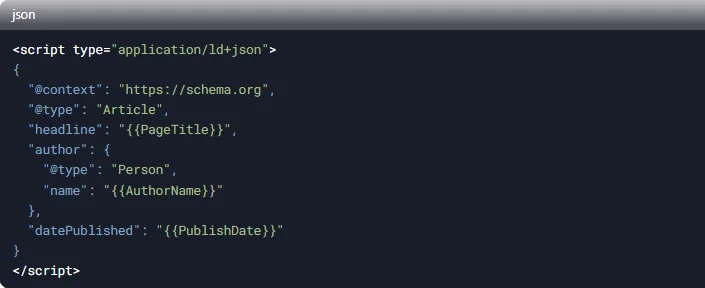
Use variables like {{PageTitle}} or {{AuthorName}} to map page-specific data. Click on the link below to get a more complete template for a blog schema data.
Use an AI tool like ChatGPT, Perplexity, DeepSeek, etc to create a custom JavaScript that would extract information for your schema template using important identifiers like ID, Classes or Attributes from your page source code to create a script that will read certain parts of your website (like the blog section) to render the JS within screaming frog and generate schema at bulk.
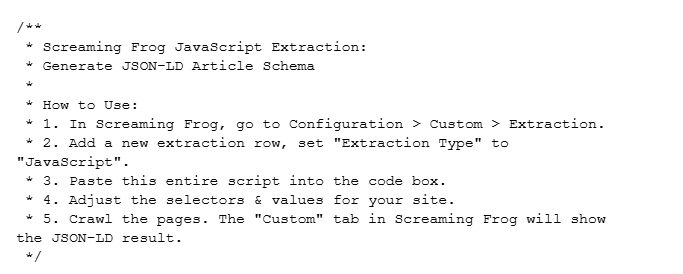
Once you have ensured that the script that is created generated a perfect schema using screaming frog for a specific use case (a website), save it at a suitable place for future use.
Click in the link below to get a workable JS template which can be directly used with ChatGPT o1 to edit and reuse.
Custom JS for Schema Generation
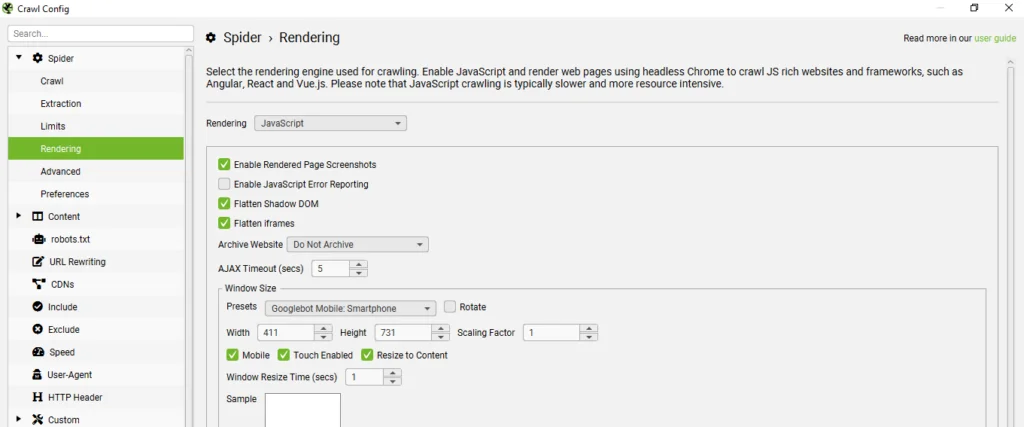
To enable JS rendering, go to: Configuration>Spider>Rendering and select JavaScript.
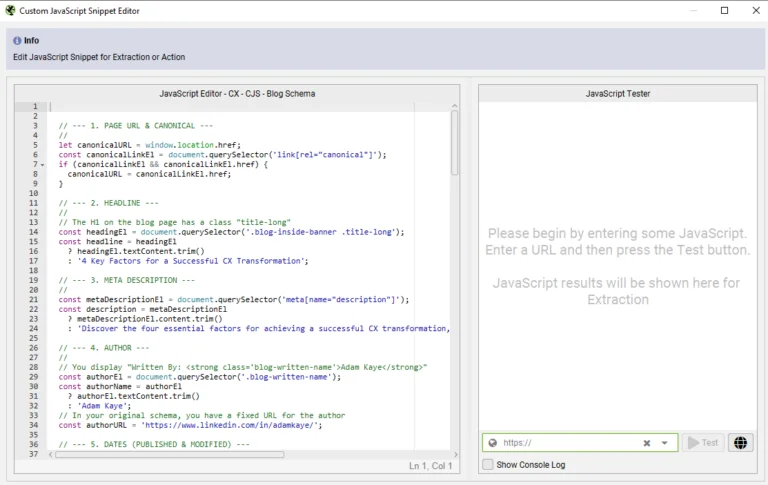
For testing go to: Configuration-Spider-Crawl-Custom-Custom-Custom JavaScript, then expand the JS snippet bar by clicking on the expand arrow icon to test your code on a specific blog URL.
Once you have ensured that the schema is generated properly without any error, implement it on the blog page and test it using Google Rich Results Test.

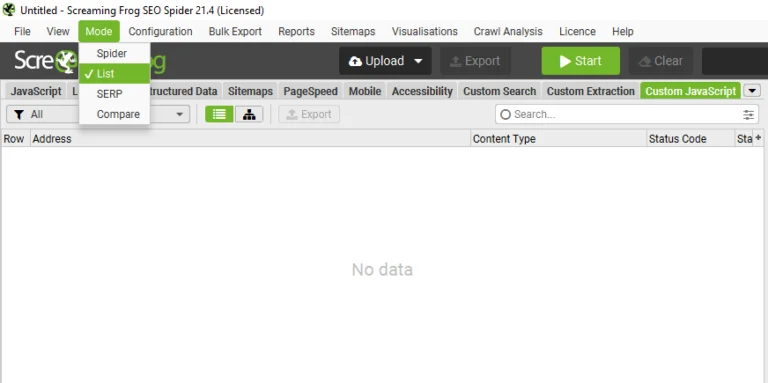
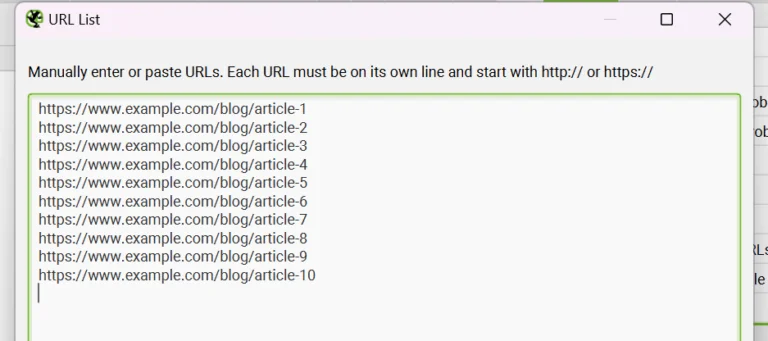
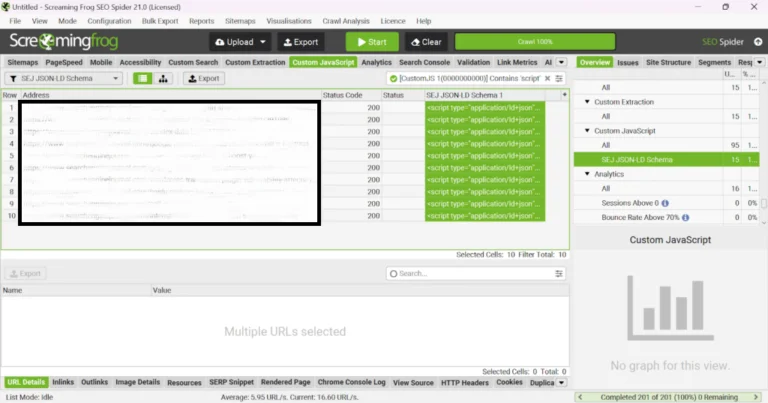
Implementing JSON-LD Schema at scale is achievable, even without WordPress plugins. By combining Screaming Frog’s JavaScript rendering with smart templating, you can:
Start with a pilot (e.g., blog posts) before scaling to product/category pages.
The Enterprise Martech Problem: Data Without Insights Most enterprises face a critical challenge today. They collect massive customer data across CRM platforms, analytics tools, ad networks, and email systems. Yet this data remains siloed and disconnected from actual decision making. Marketing teams still rely on backward looking reports instead of forward looking intelligence. Customers demand […]
Introduction Outsourcing is usually seen as a critical choice for businesses aiming to secure specialized talent as a cost-effective solution. Traditionally, global hubs in the southern hemisphere, such as India, Brazil, and the Philippines, established themselves by offering a comprehensive range of business operations at reduced costs. However, a real change is now sweeping across […]
Search is changing fast. People no longer scroll through ten blue links. They ask questions and expect direct answers. Tools like Google AI Overviews, ChatGPT, voice assistants, and other AI answer engines now decide what information gets shown first. This shift has created a new discipline called Answer Engine Optimization (AEO). Instead of only ranking […]
Introduction Small website issues rarely announce themselves loudly. They do not trigger alerts, crash servers, or stop traffic overnight. Instead, they quietly introduce friction into the buyer journey. Over time, these small breakdowns compound, reducing conversion rates, extending sales cycles, and weakening pipeline velocity. Most B2B teams focus on driving more traffic when pipeline slows. […]