5 min read
Structured data (Schema markup) is a cornerstone of modern SEO. It helps search engines understand your content, leading to rich search results like featured snippets, product carousels, and knowledge panels. However, implementing Schema at scale becomes challenging for websites using custom content management systems (CMS) such as Webflow, Drupal, or headless setups. These platforms often lack WordPress-like plugins, forcing teams to rely on costly third-party tools or complex manual coding.
Enter Screaming Frog, a powerful web crawler best known for technical SEO audits. Its JavaScript rendering feature allows you to analyze and manipulate fully rendered pages, making it an ideal tool for generating and validating JSON-LD Schema markup across large websites.
In this guide, we’ll explore how to automate Schema implementation at scale, even on CMS platforms that lack native support.
Understanding the Challenge of Adding Schema in Non-WordPress CMS
Common Obstacles
- Limited Plugin Availability: Platforms like Webflow or headless CMSs rarely offer built-in Schema generators.
- Costly Integrations: Third-party tools often charge per page or require developer resources.
- Manual Coding Complexity: Hardcoding JSON-LD for thousands of pages is error-prone and time-consuming.
Why Schema is Often Overlooked?
Many teams deprioritize Schema due to competing development priorities or underestimating its SEO impact. For instance, a blog without Article Schema may miss out on rich snippets, while product pages lacking Product markup won’t appear in shopping carousels.
Screaming Frog’s JavaScript Rendering Feature
What is JavaScript Rendering?
Screaming Frog uses a headless browser (Chromium) to crawl pages exactly as a user or Googlebot-would see them. This means it processes JavaScript, AJAX, and dynamically loaded content, providing an accurate snapshot of the rendered DOM.
Why JavaScript Rendering is Critical for Schema Implementation?
Accurate Analysis: Many CMS platforms inject content via JavaScript, which traditional crawlers miss.
Google’s Perspective: Since Google renders JavaScript, Screaming Frog’s JS rendering ensures your Schema is visible to search engines.
Step 1 – Setting Up Your Crawl
1.1 – Initial Configurations
- Download Screaming Frog: Install the SEO Spider tool.
- Enable JavaScript Rendering:
a. Navigate to Configuration > Spider > Rendering.
b. Select JavaScript and set the Rendering Wait Time to 2-5 seconds. - Start Crawling: Enter your domain and hit Start.
1.2 – Choosing the Right Crawl Depth & Speed
- Crawl Depth: Set to “Unlimited” to capture all pages.
- Speed: Use the default “Medium” speed for most sites. For large sites (>10k pages), consider “Slow” to avoid server overload.
Step 2 – Generating the JavaScript to Crawl Webpages
2.1 – Identifying Page Types & Schema Requirements
- Blog Pages: Article, Author, Organization.
- Product Pages: Product, Brand, AggregateRating.
- Local Businesses: LocalBusiness, PostalAddress, GeoCoordinates.
2.2 – Creating JSON-LD Templates
Build reusable templates with placeholders. For example, a blog post template:
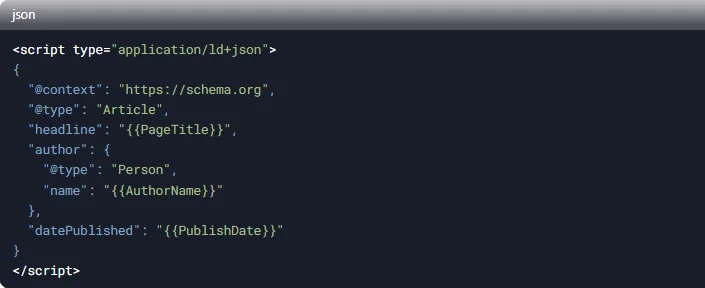
Use variables like {{PageTitle}} or {{AuthorName}} to map page-specific data. Click on the link below to get a more complete template for a blog schema data.
Step 3 – Creating Schema Using JavaScript Rendering with Screaming Frog
3.1 – Create a GPT-Generated JavaScript for Screaming Frog
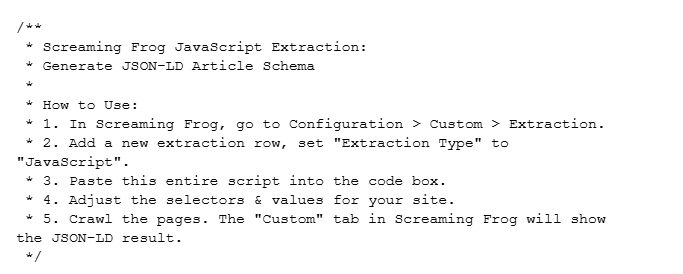
Use an AI tool like ChatGPT, Perplexity, DeepSeek, etc to create a custom JavaScript that would extract information for your schema template using important identifiers like ID, Classes or Attributes from your page source code to create a script that will read certain parts of your website (like the blog section) to render the JS within screaming frog and generate schema at bulk.
3.2 – Save a Copy of Your Template So that It can be Used for Other Websites as Well
Once you have ensured that the script that is created generated a perfect schema using screaming frog for a specific use case (a website), save it at a suitable place for future use.
Click in the link below to get a workable JS template which can be directly used with ChatGPT o1 to edit and reuse.
Custom JS for Schema Generation
Enable JS rendering on Screaming Frog
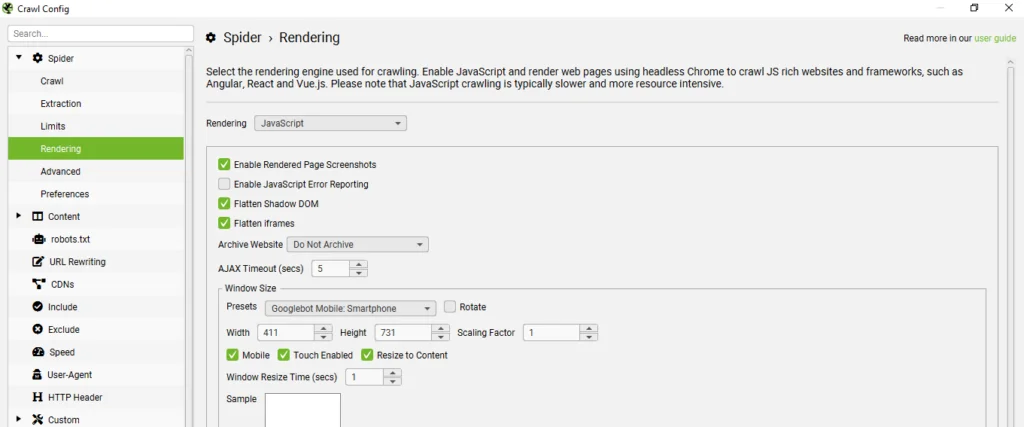
To enable JS rendering, go to: Configuration>Spider>Rendering and select JavaScript.
3.3 – Test the Script with One of The blog / Pages on Your Website
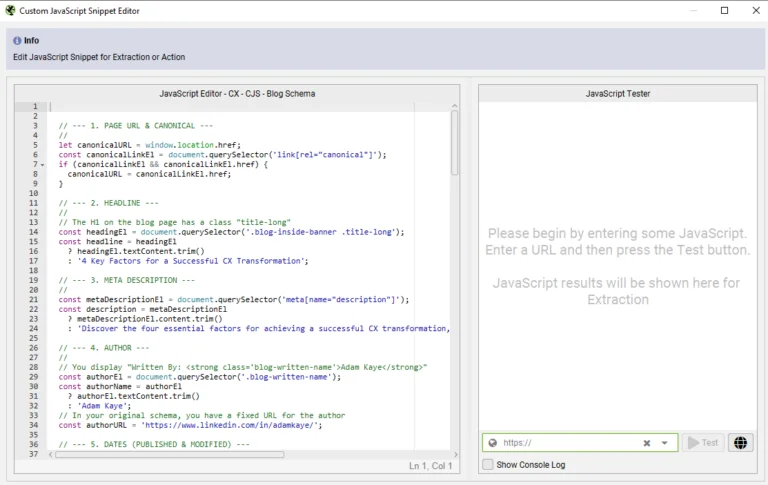
For testing go to: Configuration-Spider-Crawl-Custom-Custom-Custom JavaScript, then expand the JS snippet bar by clicking on the expand arrow icon to test your code on a specific blog URL.
Once you have ensured that the schema is generated properly without any error, implement it on the blog page and test it using Google Rich Results Test.
3.4 – Save the Script in Your JS Library Within Screaming Frog with the Website Name

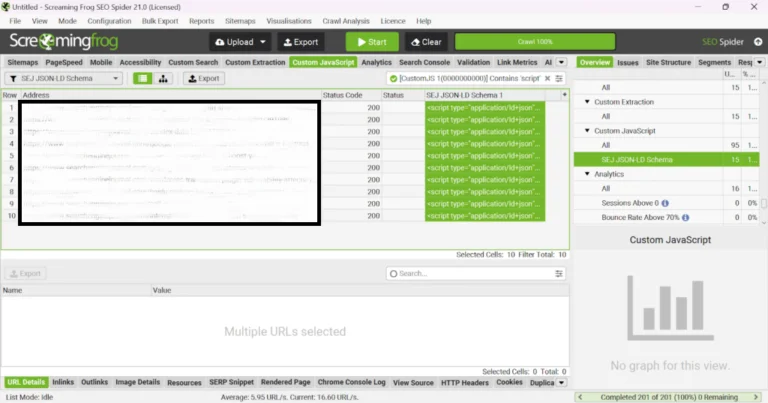
3.5 – Use the List Mode Instead of Spider to Upload a List of all the Blogs From Your Website
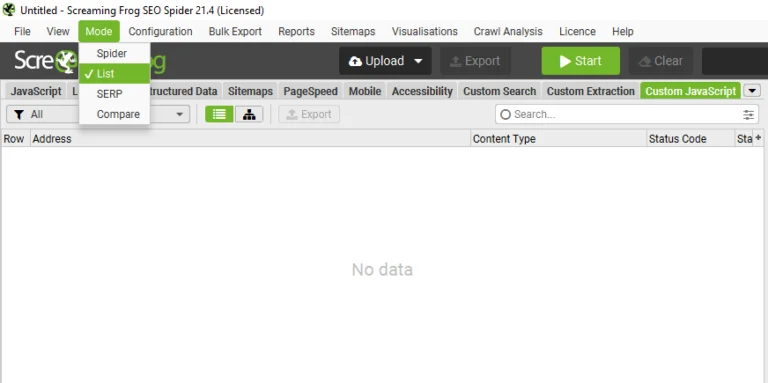
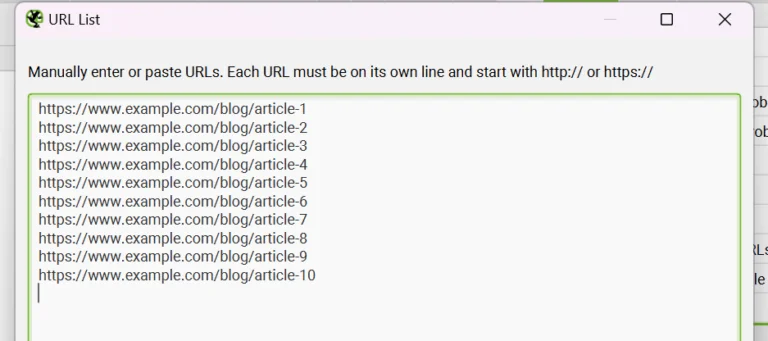
3.6 – Perform a Crawl and Export a CSV File With all the Schema
Common Pitfalls and Troubleshooting
Errors in JSON-LD
- Syntax Issues: Validate JSON with tools like JSONLint.
- Missing Fields: Ensure required properties (e.g., @context, @type) are included.
Incomplete Rendering
- Blocked Resources: Whitelist scripts in Configuration > Spider > Ignore > JavaScript/CSS.
- Increase Rendering Wait Time: Adjust to 5-10 seconds for heavy pages.
Additional Use Cases Beyond Blog Pages
Product Schema
- Key Properties: price, brand, availability.
- Bulk Generation: Export product IDs and attributes from your e-commerce platform.
Local Business Schema
- NAP Consistency: Ensure name, address, and phone match directory listings.
- GeoCoordinates: Embed latitude/longitude for map integrations.
Event Schema
- Dates: Use ISO format (YYYY-MM-DD).
- Virtual Events: Include location as schema.org
Implementing JSON-LD Schema at scale is achievable, even without WordPress plugins. By combining Screaming Frog’s JavaScript rendering with smart templating, you can:
- Crawl Rendered Pages to identify dynamic content.
- Extract Data for personalized JSON-LD templates.
- Generate & Implement schema across the site.
Final Recommendation
Start with a pilot (e.g., blog posts) before scaling to product/category pages.